/ Java EE Support Patterns

11.01.2012

Java deadlock troubleshooting and resolution

One of the great things about JavaOne annual conferences is the presentation of several technical and troubleshooting labs presented by subject matter experts. One of these labs did especially capture my attention this year: “HOL6500 - Finding And Solving Java Deadlocks”, presented by Java Champion Heinz Kabutz. This is one of the best presentations I have seen on this subject. I recommend that you download, run and study the labs yourself.

This article will revisit this classic thread problem and summarize the key troubleshooting and resolution techniques presented. I will also expand the subject based on my own multi-threading troubleshooting experience.

Java deadlock: what is it?

A true Java deadlock can essentially be described as a situation where two or more threads are blocked forever, waiting for each other. This situation is very different from other more commons “day-to-day” thread problem patterns such as lock contention & thread races, threads waiting on blocking IO calls etc.  Such lock-ordering deadlock situation can be visualized as per below:


In the above visual example, the attempt by Thread A & Thread B to acquire 2 locks in different orders is fatal. Once threads reached the deadlocked state, they can never recover, forcing you to restart the affected JVM process.

Heinz also describes another type of deadlock: resource deadlock. This is by far the most common thread problem pattern I have seen in my experience with Java EE enterprise system troubleshooting. A resource deadlock is essentially a scenario where one or multiple threads are waiting to acquire a resource which will never be available such as JDBC Pool depletions.

Lock-ordering deadlocks

You should know by now that I am a big fan of JVM thread dump analysis; crucial skill to acquire for individuals either involved in Java/Java EE development or production support. The good news is that Java-level deadlocks can be easily identified out-of-the-box by most JVM thread dump formats (HotSpot, IBM VM…) since they contain a native deadlock detection mechanism which will actually show you the threads involved in a true Java-level deadlock scenario along with the execution stack trace. JVM thread dump can be captured via the tool of your choice such as JVisualVM, jstack or natively such as kill -3 <PID> on Unix-based OS. Find below the JVM Java-level deadlock detection section after running lab 1:


Now this is the easy part…The core of the root cause analysis effort is to understand why such threads are involved in a deadlock situation at the first place. Lock-ordering deadlocks could be triggered from your application code but unless you are involved in high concurrency programming, chances are that the culprit code is a third part API or framework that you are using or the actual Java EE container itself, when applicable.

Now let’s review below the lock-ordering deadlock resolution strategies presented by Heinz:

# Deadlock resolution by global ordering (see lab1 solution)

  • Essentially involves the definition of a global ordering for the locks that would always prevent deadlock (please see lab1 solution)

# Deadlock resolution by TryLock (see lab2 solution)

  • Lock the first lock
  • Then try to lock the second lock
  • If you can lock it, you are good to go
  • If you cannot, wait and try again
The above strategy can be implemented using Java Lock & ReantrantLock which also gives you also flexibility to setup a wait timeout in order to prevent thread starvation in the event the first lock is acquired for too long.

public interface Lock {
    void lock();
    void lockInterruptibly() throws InterruptedException;
    boolean tryLock();
    boolean tryLock(long timeout, TimeUnit unit)
        throws InterruptedException;
    void unlock();
    Condition newCondition();
}

If you look at the JBoss AS7 implementation, you will notice that Lock & ReantrantLock are widely used from core implementation layers such as:

  • Deployment service
  • EJB3 implementation (widely used)
  • Clustering and session management
  • Internal cache & data structures (LRU, ConcurrentReferenceHashMap…)
        
Now and as per Heinz’s point, the deadlock resolution strategy #2 can be quite efficient but proper care is also required such as releasing all held lock via a finally{} block otherwise you can transform your deadlock scenario into a livelock.

Resource deadlocks

Now let’s move to resource deadlock scenarios. I’m glad that Heinz's lab #3 covered this since from my experience this is by far the most common “deadlock” scenario that you will see, especially if you are developing and supporting large distributed Java EE production systems.

Now let’s get the facts right.

  • Resource deadlocks are not true Java-level deadlocks
  • The JVM Thread Dump will not magically should you these types of deadlocks. This means more work for you to analyze and understand this problem as a starting point.
  • Thread dump analysis can be especially confusing when you are just starting to learn how to read Thread Dump since threads will often show up as RUNNING state vs. BLOCKED state for Java-level deadlocks. For now, it is important to keep in mind that thread state is not that important for this type of problem e.g. RUNNING state != healthy state.
  • The analysis approach is very different than Java-level deadlocks. You must take multiple thread dump snapshots and identify thread problem/wait patterns between each snapshot. You will be able to see threads not moving e.g. threads waiting to acquire a resource from a pool and other threads that already acquired such resource and hanging…
  • Thread Dump analysis is not the only data point/fact important here. You will need to collect other facts such statistics on the resource(s) the threads are waiting for, overall middleware or environment health etc. The combination of all these facts will allow you to conclude on the root cause along with a resolution strategy which may or may not involve code change.
I will get back to you with more thread dump problem patterns but first please ensure that you are comfortable with the basic principles of JVM thread dump as a starting point.

Conclusion

I hope you had the chance to review, run and enjoy the labs from Heinz's presentation as much as I did. Concurrency programming and troubleshooting can be quite challenging but I still recommend that you spend some time trying to understand some of these principles since I’m confident you will face a situation in the near future that will force you to perform this deep dive and acquire those skills.

10.04.2012

3 things Java developers should know

Here is an interesting article for those of should who have been following remotely the JavaOne 2012 conference. A recent interview with the Java Champion Heinz Kabutz was brought to my attention; including his Java memory puzzle program which was quite instructive from a Java memory management perspective.

One particular section of the interview captured my attention: things Java developers should know and currently do not. Heinz made some really good points in his interview.
This article will revisit and expand on Java developer must-have skills.

Heinz is also sharing his concerns regarding the removal of the HotSpot VM PermGen space which is now targeted more for the Java 8 release. 

Java concurrency principles: should you care or not?

As Heinz pointed out, this is often a topic that some Java developers prefer to avoid. Unless you are developing a single thread main program, you do have to worry about thread concurrency and all the associated problems. As a Java EE developer, your code will be running within a high concurrent threads environment. Simple Java coding mistakes can expose your code to severe thread race conditions, stability and performance problems. Lack of key thread knowledge can also prevent you to properly fine tune the Java EE container thread pool layer.

From my perspective, every Java developer should try to understand the basic Java concurrency principles from both a development and troubleshooting perspective such as JVM Thread Dump analysis.

Raise your IDE skills to the next level: learn shortcut keys

Next Heinz’s recommendation is to acquire deeper knowledge of your Java IDE environment. This tip may sound obvious for some but you would actually be surprised how many Java developers can quickly “plateau” with their IDE usage and productivity. Such “plateau” is often due to a lack of deeper exploration of your IDE shortcut keys and capabilities.

This article from DZone is a nice starting point to learn useful shortcuts if using the Eclipse IDE.

Java memory management: learn how to read GC logs

Last but not the least: learn how to read GC logs. This is my favorite of all Hein’s recommendations.

As you saw from my previous tutorial, JVM GC logs contain some crucial information on your Java VM memory footprint and garbage collection health. This data is especially critical when performing tuning of your JVM or troubleshooting OutOfMemoryError: Java Heap Space related problems.

Let's be honest here, It will take time before you can acquire about just half the knowledge of Java Champions such as Kirk Pepperdine but starting to analyze and understand your application GC logs and the Java memory management fundamentals is a perfect place to start.

10.01.2012

JavaOne™ 2012 review


This post is to inform you that that I will be reviewing and commenting the most pertinent JavaOne™ 2012 sessions for the next few weeks. 

JavaOne™ is an annual conference to discuss Java related technologies among Java developers; including trends, emergencies technologies, best practices etc.

Please stay tuned for regular post updates.

Thanks.
P-H

9.28.2012

Log4j Thread Deadlock – A Case Study

This case study describes the complete root cause analysis and resolution of an Apache Log4j thread race problem affecting a Weblogic Portal 10.0 production environment. It will also demonstrate the importance of proper Java classloader knowledge when developing and supporting Java EE applications.

This article is also another opportunity for you to improve your thread dump analysis skills and understand thread race conditions.

Environment specifications

  • Java EE server: Oracle Weblogic Portal 10.0
  • OS: Solaris 10
  • JDK: Oracle/Sun HotSpot JVM 1.5
  • Logging API: Apache Log4j 1.2.15
  • RDBMS: Oracle 10g
  • Platform type: Web Portal

Troubleshooting tools

  • Quest Foglight for Java (monitoring and alerting)
  • Java VM Thread Dump (thread race analysis)

Problem overview

Major performance degradation was observed from one of our Weblogic Portal production environments. Alerts were also sent from the Foglight agents indicating a significant surge in Weblogic threads utilization up to the upper default limit of 400.

Gathering and validation of facts

As usual, a Java EE problem investigation requires gathering of technical and non technical facts so we can either derived other facts and/or conclude on the root cause. Before applying a corrective measure, the facts below were verified in order to conclude on the root cause:

  • What is the client impact? HIGH
  • Recent change of the affected platform? Yes, a recent deployment was performed involving minor content changes and some Java libraries changes & refactoring
  • Any recent traffic increase to the affected platform? No
  • Since how long this problem has been observed?  New problem observed following the deployment
  • Did a restart of the Weblogic server resolve the problem? No, any restart attempt did result in an immediate surge of threads
  • Did a rollback of the deployment changes resolve the problem? Yes

Conclusion #1: The problem appears to be related to the recent changes. However, the team was initially unable to pinpoint the root cause. This is now what we will discuss for the rest of the article.

Weblogic hogging thread report

The initial thread surge problem was reported by Foglight. As you can see below, the threads utilization was significant (up to 400) leading to a high volume of pending client requests and ultimately major performance degradation.


As usual, thread problems require proper thread dump analysis in order to pinpoint the source of threads contention. Lack of this critical analysis skill will prevent you to go any further in the root cause analysis.

For our case study, a few thread dump snapshots were generated from our Weblogic servers using the simple Solaris OS command kill -3 <Java PID>. Thread Dump data was then extracted from the Weblogic standard output log files.

Thread Dump analysis

The first step of the analysis was to perform a fast scan of all stuck threads and pinpoint a problem “pattern”. We found 250 threads stuck in the following execution path:

"[ACTIVE] ExecuteThread: '20' for queue: 'weblogic.kernel.Default (self-tuning)'" daemon prio=10 tid=0x03c4fc38 nid=0xe6 waiting for monitor entry [0x3f99e000..0x3f99f970]
       at org.apache.log4j.Category.callAppenders(Category.java:186)
       - waiting to lock <0x8b3c4c68> (a org.apache.log4j.spi.RootCategory)
       at org.apache.log4j.Category.forcedLog(Category.java:372)
       at org.apache.log4j.Category.log(Category.java:864)
       at org.apache.commons.logging.impl.Log4JLogger.debug(Log4JLogger.java:110)
       at org.apache.beehive.netui.util.logging.Logger.debug(Logger.java:119)
       at org.apache.beehive.netui.pageflow.DefaultPageFlowEventReporter.beginPageRequest(DefaultPageFlowEventReporter.java:164)
       at com.bea.wlw.netui.pageflow.internal.WeblogicPageFlowEventReporter.beginPageRequest(WeblogicPageFlowEventReporter.java:248)
       at org.apache.beehive.netui.pageflow.PageFlowPageFilter.doFilter(PageFlowPageFilter.java:154)
       at weblogic.servlet.internal.FilterChainImpl.doFilter(FilterChainImpl.java:42)
       at com.bea.p13n.servlets.PortalServletFilter.doFilter(PortalServletFilter.java:336)
       at weblogic.servlet.internal.FilterChainImpl.doFilter(FilterChainImpl.java:42)
       at weblogic.servlet.internal.RequestDispatcherImpl.invokeServlet(RequestDispatcherImpl.java:526)
       at weblogic.servlet.internal.RequestDispatcherImpl.forward(RequestDispatcherImpl.java:261)
       at <App>.AppRedirectFilter.doFilter(RedirectFilter.java:83)
       at weblogic.servlet.internal.FilterChainImpl.doFilter(FilterChainImpl.java:42)
       at <App>.AppServletFilter.doFilter(PortalServletFilter.java:336)
       at weblogic.servlet.internal.FilterChainImpl.doFilter(FilterChainImpl.java:42)
       at weblogic.servlet.internal.WebAppServletContext$ServletInvocationAction.run(WebAppServletContext.java:3393)
       at weblogic.security.acl.internal.AuthenticatedSubject.doAs(AuthenticatedSubject.java:321)
       at weblogic.security.service.SecurityManager.runAs(Unknown Source)
       at weblogic.servlet.internal.WebAppServletContext.securedExecute(WebAppServletContext.java:2140)
       at weblogic.servlet.internal.WebAppServletContext.execute(WebAppServletContext.java:2046)
       at weblogic.servlet.internal.ServletRequestImpl.run(Unknown Source)
       at weblogic.work.ExecuteThread.execute(ExecuteThread.java:200)
       at weblogic.work.ExecuteThread.run(ExecuteThread.java:172)


As you can see, it appears that all the threads are waiting to acquire a lock on an Apache Log4j object monitor (org.apache.log4j.spi.RootCategory) when attempting to log debug information to the configured appender and log file. How did we figure that out from this thread stack trace? Let’s dissect this thread stack trace in order for you to better understand this thread race condition e.g. 250 threads attempting to acquire the same object monitor concurrently.


At this point the main question is why are we seeing this problem suddenly? An increase of the logging level or load was also ruled out at this point after proper verification. The fact that the rollback of the previous changes did fix the problem did naturally lead us to perform a deeper review of the promoted changes. Before we go to the final root cause section, we will perform a code review of the affected Log4j code e.g. exposed to thread race conditions.

Apache Log4j 1.2.15 code review


## org.apache.log4j.Category
/**
        * Call the appenders in the hierrachy starting at <code>this</code>. If no
        * appenders could be found, emit a warning.
        *
        * <p>
        * This method calls all the appenders inherited from the hierarchy
        * circumventing any evaluation of whether to log or not to log the
        * particular log request.
        *
        * @param event
        *            the event to log.
        */
       public void callAppenders(LoggingEvent event) {
             int writes = 0;

             for (Category c = this; c != null; c = c.parent) {
                    // Protected against simultaneous call to addAppender,
                    // removeAppender,...
                    synchronized (c) {
                           if (c.aai != null) {
                                 writes += c.aai.appendLoopOnAppenders(event);
                           }
                           if (!c.additive) {
                                 break;
                           }
                    }
             }

             if (writes == 0) {
                    repository.emitNoAppenderWarning(this);
             }
            
As you can see, the Catelogry.callAppenders() is using a synchronized block at the Category level which can lead to a severe thread race condition under heavy concurrent load. In this scenario, the usage of a re-entrant read write lock would have been more appropriate (e.g. such lock strategy allows concurrent “read” but single “write”). You can find reference to this known Apache Log4j limitation below along with some possible solutions.


Does the above Log4j behaviour is the actual root cause of our problem? Not so fast…
Let’s remember that this problem got exposed only following a recent deployment. The real question is what application change triggered this problem & side effect from the Apache Log4j logging API?

Root cause: a perfect storm!

Deep dive analysis of the recent changes deployed did reveal that some Log4j libraries at the child classloader level were removed along with the associated “child first” policy. This refactoring exercise ended-up moving the delegation of both Commons logging and Log4j at the parent classloader level. What is the problem?

Before this change, the logging events were split between Weblogic Beehive Log4j calls at the parent classloader and web application logging events at the child class loader. Since each classloader had its own copy of the Log4j objects, the thread race condition problem was split in half and not exposed (masked) under the current load conditions. Following the refactoring, all Log4j calls were moved to the parent classloader (Java EE app); adding significant concurrency level to the Log4j components such as Category. This increase concurrency level along with this known Category.java thread race / deadlock behaviour was a perfect storm for our production environment.

In other to mitigate this problem, 2 immediate solutions were applied to the environment:

  • Rollback the refactoring and split Log4j calls back between parent and child classloader
  • Reduce logging level for some appenders from DEBUG to WARNING
This problem case again re-enforce the importance of performing proper testing and impact assessment when applying changes such as library and class loader related changes. Such changes can appear simple at the "surface" but can trigger some deep execution pattern changes, exposing your application(s) to known thread race conditions.

A future upgrade to Apache Log4j 2 (or other logging API’s) will also be explored as it is expected to bring some performance enhancements which may address some of these thread race & scalability concerns.

Please provide any comment or share your experience on thread race related problems with logging API's.

9.21.2012

OutOfMemoryError: unable to create new native thread – Problem Demystified

As you may have seen from my previous tutorials and case studies, Java Heap Space OutOfMemoryError problems can be complex to pinpoint and resolve. One of the common problems I have observed from Java EE production systems is OutOfMemoryError: unable to create new native thread; error thrown when the HotSpot JVM is unable to further create a new Java thread. 

This article will revisit this HotSpot VM error and provide you with recommendations and resolution strategies. 

If you are not familiar with the HotSpot JVM, I first recommend that you look at a high level view of its internal HotSpot JVM memory spaces. This knowledge is important in order for you to understand OutOfMemoryError problems related to the native (C-Heap) memory space.


OutOfMemoryError: unable to create new native thread – what is it?

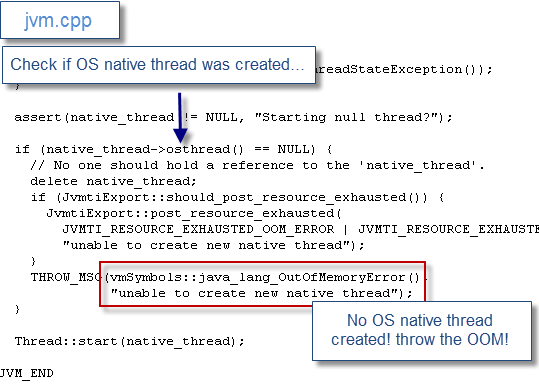
Let’s start with a basic explanation. This HotSpot JVM error is thrown when the internal JVM native code is unable to create a new Java thread. More precisely, it means that the JVM native code was unable to create a new “native” thread from the OS (Solaris, Linux, MAC, Windows...).

We can clearly see this logic from the OpenJDK 1.6 and 1.7 implementations as per below:


Unfortunately at this point you won’t get more detail than this error, with no indication of why the JVM is unable to create a new thread from the OS…


HotSpot JVM: 32-bit or 64-bit?

Before you go any further in the analysis, one fundamental fact that you must determine from your Java or Java EE environment is which version of HotSpot VM you are using e.g. 32-bit or 64-bit.

Why is it so important? What you will learn shortly is that this JVM problem is very often related to native memory depletion; either at the JVM process or OS level. For now please keep in mind that:

  • A 32-bit JVM process is in theory allowed to grow up to 4 GB (even much lower on some older 32-bit Windows versions).
  • For a 32-bit JVM process, the C-Heap is in a race with the Java Heap and PermGen space e.g. C-Heap capacity = 2-4 GB – Java Heap size (-Xms, -Xmx) – PermGen size (-XX:MaxPermSize)
  • A 64-bit JVM process is in theory allowed to use most of the OS virtual memory available or up to 16 EB (16 million TB)
 As you can see, if you allocate a large Java Heap (2 GB+) for a 32-bit JVM process, the native memory space capacity will be reduced automatically, opening the door for JVM native memory allocation failures.

For a 64-bit JVM process, your main concern, from a JVM C-Heap perspective, is the capacity and availability of the OS physical, virtual and swap memory.


OK great but how does native memory affect Java threads creation?

Now back to our primary problem. Another fundamental JVM aspect to understand is that Java threads created from the JVM requires native memory from the OS. You should now start to understand the source of your problem…

The high level thread creation process is as per below:

  • A new Java thread is requested from the Java program & JDK
  • The JVM native code then attempt to create a new native thread from the OS
  • The OS then attempts to create a new native thread as per attributes which include the thread stack size. Native memory is then allocated (reserved) from the OS to the Java process native memory space; assuming the process has enough address space (e.g. 32-bit process) to honour the request
  • The OS will refuse any further native thread & memory allocation if the 32-bit Java process size has depleted its memory address space e.g. 2 GB, 3 GB or 4 GB process size limit
  • The OS will also refuse any further Thread & native memory allocation if the virtual memory of the OS is depleted (including Solaris swap space depletion since thread access to the stack can generate a SIGBUS error, crashing the JVM * http://bugs.sun.com/view_bug.do?bug_id=6302804

In summary:

  • Java threads creation require native memory available from the OS; for both 32-bit & 64-bit JVM processes
  • For a 32-bit JVM, Java thread creation also requires memory available from the C-Heap or process address space

Problem diagnostic

Now that you understand native memory and JVM thread creation a little better, is it now time to look at your problem. As a starting point, I suggest that your follow the analysis approach below:

  1. Determine if you are using HotSpot 32-bit or 64-bit JVM
  2. When problem is observed, take a JVM Thread Dump and determine how many Threads are active
  3. Monitor closely the Java process size utilization before and during the OOM problem replication
  4. Monitor closely the OS virtual memory utilization before and during the OOM problem replication; including the swap memory space utilization if using Solaris OS

Proper data gathering as per above will allow you to collect the proper data points, allowing you to perform the first level of investigation. The next step will be to look at the possible problem patterns and determine which one is applicable for your problem case.

Problem pattern #1 – C-Heap depletion (32-bit JVM)

From my experience, OutOfMemoryError: unable to create new native thread is quite common for 32-bit JVM processes. This problem is often observed when too many threads are created vs. C-Heap capacity.
JVM Thread Dump analysis and Java process size monitoring will allow you to determine if this is the cause.

Problem pattern #2 – OS virtual memory depletion (64-bit JVM)

In this scenario, the OS virtual memory is fully depleted. This could be due to a few 64-bit JVM processes taking lot memory e.g. 10 GB+ and / or other high memory footprint rogue processes. Again, Java process size & OS virtual memory monitoring will allow you to determine if this is the cause.

Also, please verify if you are not hitting OS related threshold such as ulimit -u or NPROC (max user processes). Default limits are usually low and will prevent you to create let's say more than 1024 threads per Java process.

Problem pattern #3 – OS virtual memory depletion (32-bit JVM)

The third scenario is less frequent but can still be observed. The diagnostic can be a bit more complex but the key analysis point will be to determine which processes are causing a full OS virtual memory depletion. Your 32-bit JVM processes could be either the source or the victim such as rogue processes using most of the OS virtual memory and preventing your 32-bit JVM processes to reserve more native memory for its thread creation process.

Please note that this problem can also manifest itself as a full JVM crash (as per below sample) when running out of OS virtual memory or swap space on Solaris.

#
# A fatal error has been detected by the Java Runtime Environment:
#
# java.lang.OutOfMemoryError: requested 32756 bytes for ChunkPool::allocate. Out of swap space?
#
#  Internal Error (allocation.cpp:166), pid=2290, tid=27
#  Error: ChunkPool::allocate
#
# JRE version: 6.0_24-b07
# Java VM: Java HotSpot(TM) Server VM (19.1-b02 mixed mode solaris-sparc )
# If you would like to submit a bug report, please visit:
#   http://java.sun.com/webapps/bugreport/crash.jsp
#

---------------  T H R E A D  ---------------

Current thread (0x003fa800):  JavaThread "CompilerThread1" daemon [_thread_in_native, id=27, stack(0x65380000,0x65400000)]

Stack: [0x65380000,0x65400000],  sp=0x653fd758,  free space=501k
Native frames: (J=compiled Java code, j=interpreted, Vv=VM code, C=native code)
………………


Native memory depletion: symptom or root cause?

You now understand your problem and know which problem pattern you are dealing with. You are now ready to provide recommendations to address the problem…are you?

Your work is not done yet, please keep in mind that this JVM OOM event is often just a “symptom” of the actual root cause of the problem. The root cause is typically much deeper so before providing recommendations to your client I recommend that you really perform deeper analysis. The last thing you want to do is to simply address and mask the symptoms. Solutions such as increasing OS physical / virtual memory or upgrading all your JVM processes to 64-bit should only be considered once you have a good view on the root cause and production environment capacity requirements.

The next fundamental question to answer is how many threads were active at the time of the OutOfMemoryError? In my experience with Java EE production systems, the most common root cause is actually the application and / or Java EE container attempting to create too many threads at a given time when facing non happy paths such as thread stuck in a remote IO call, thread race conditions etc. In this scenario, the Java EE container can start creating too many threads when attempting to honour incoming client requests, leading to increase pressure point on the C-Heap and native memory allocation. Bottom line, before blaming the JVM, please perform your due diligence and determine if you are dealing with an application or Java EE container thread tuning problem as the root cause.

Once you understand and address the root cause (source of thread creations), you can then work on tuning your JVM and OS memory capacity in order to make it more fault tolerant and better “survive” these sudden thread surge scenarios.

Recommendations:

  • First, quickly rule out any obvious OS memory (physical & virtual memory) & process capacity (e.g. ulimit -u / NPROC) problem.
  • Perform a JVM Thread Dump analysis and determine the source of all the active threads vs. an established baseline. Determine what is causing your Java application or Java EE container to create so many threads at the time of the failure
  • Please ensure that your monitoring tools closely monitor both your Java VM processes size & OS virtual memory. This crucial data will be required in order to perform a full root cause analysis. Please remember that a 32-bit Java process size is limited between 2 GB - 4 GB depending of your OS
  • Look at all running processes and determine if your JVM processes are actually the source of the problem or victim of other processes consuming all the virtual memory
  • Revisit your Java EE container thread configuration & JVM thread stack size. Determine if the Java EE container is allowed to create more threads than your JVM process and / or OS can handle
  • Determine if the Java Heap size of your 32-bit JVM is too large, preventing the JVM to create enough threads to fulfill your client requests. In this scenario, you will have to consider reducing your Java Heap size (if possible), vertical scaling or upgrade to a 64-bit JVM
Capacity planning analysis to the rescue

As you may have seen from my past article on the Top 10 Causes of Java EE Enterprise Performance Problems, lack of capacity planning analysis is often the source of the problem. Any comprehensive load and performance testing exercise should also properly determine the Java EE container threads, JVM & OS native memory requirement for your production environment; including impact measurements of "non-happy" paths. This approach will allow your production environment to stay away from this type of problem and lead to better system scalability and stability in the long run.

Please provide any comment and share your experience with JVM native thread troubleshooting.

8.29.2012

Java 7: HashMap vs ConcurrentHashMap

As you may have seen from my past performance related articles and HashMap case studies, Java thread safety problems can bring down your Java EE application and the Java EE container fairly easily. One of most common problems I have observed when troubleshooting Java EE performance problems is infinite looping triggered from the non-thread safe HashMap get() and put() operations. This problem is known since several years but recent production problems have forced me to revisit this issue one more time.

This article will revisit this classic thread safety problem and demonstrate, using a simple Java program, the risk associated with a wrong usage of the plain old java.util.HashMap data structure involved in a concurrent threads context.

This proof of concept exercise will attempt to achieve the following 3 goals:

  • Revisit and compare the Java program performance level between the non-thread safe and thread safe Map data structure implementations (HashMap, Hashtable, synchronized HashMap, ConcurrentHashMap)
  • Replicate and demonstrate the HashMap infinite looping problem using a simple Java program that everybody can compile, run and understand
  • Review the usage of the above Map data structures in a real-life and modern Java EE container implementation such as JBoss AS7
For more detail on the ConcurrentHashMap implementation strategy, I highly recommend the great article from Brian Goetz on this subject.

Tools and server specifications

As a starting point, find below the different tools and software’s used for the exercise:

  • Sun/Oracle JDK & JRE 1.7 64-bit
  • Eclipse Java EE IDE
  • Windows Process Explorer (CPU per Java Thread correlation)
  • JVM Thread Dump (stuck thread analysis and CPU per Thread correlation)
The following local computer was used for the problem replication process and performance measurements:

  • Intel(R) Core(TM) i5-2520M CPU @ 2.50Ghz (2 CPU cores, 4 logical cores)
  • 8 GB RAM
  • Windows 7 64-bit
* Results and performance of the Java program may vary depending of your workstation or server specifications.

Java program

 In order to help us achieve the above goals, a simple Java program was created as per below:

  • The main Java program is HashMapInfiniteLoopSimulator.java
  • A worker Thread class WorkerThread.java was also created

The program is performing the following:

  • Initialize different static Map data structures with initial size of 2
  • Assign the chosen Map to the worker threads (you can chose between 4 Map implementations)
  • Create a certain number of worker threads (as per the header configuration). 3 worker threads were created for this proof of concept NB_THREADS = 3;
  • Each of these worker threads has the same task: lookup and insert a new element in the assigned Map data structure using a random Integer element between 1 – 1 000 000.
  • Each worker thread perform this task for a total of 500K iterations
  • The overall program performs 50 iterations in order to allow enough ramp up time for the HotSpot JVM
  • The concurrent threads context is achieved using the JDK ExecutorService
 As you can see, the Java program task is fairly simple but complex enough to generate the following critical criteria’s:

  • Generate concurrency against a shared / static Map data structure
  • Use a mix of get() and put() operations in order to attempt to trigger internal locks and / or internal corruption (for the non-thread safe implementation)
  • Use a small Map initial size of 2, forcing the internal HashMap to trigger an internal rehash/resize
Finally, the following parameters can be modified at your convenience:

## Number of worker threads
private static final int NB_THREADS = 3;

## Number of Java program iterations
private static final int NB_TEST_ITERATIONS = 50;

## Map data structure assignment. You can choose between 4 structures
// Plain old HashMap (since JDK 1.2)
nonThreadSafeMap = new HashMap<String, Integer>(2);
                   
// Plain old Hashtable (since JDK 1.0)
threadSafeMap1 = new Hashtable<String, Integer>(2);
                   
// Fully synchronized HashMap
threadSafeMap2 = new HashMap<String, Integer>(2);
threadSafeMap2 = Collections.synchronizedMap(threadSafeMap2);

// ConcurrentHashMap (since JDK 1.5)
threadSafeMap3 = new ConcurrentHashMap<String, Integer>(2);

/*** Assign map at your convenience ****/
assignedMapForTest = threadSafeMap3;


Now find below the source code of our sample program.

#### HashMapInfiniteLoopSimulator.java
package org.ph.javaee.training4;

import java.util.Collections;
import java.util.Map;
import java.util.HashMap;
import java.util.Hashtable;

import java.util.concurrent.ConcurrentHashMap;
import java.util.concurrent.ExecutorService;
import java.util.concurrent.Executors;

/**
 * HashMapInfiniteLoopSimulator
 * @author Pierre-Hugues Charbonneau
 *
 */
public class HashMapInfiniteLoopSimulator {

       private static final int NB_THREADS = 3;
       private static final int NB_TEST_ITERATIONS = 50;
      
       private static Map<String, Integer> assignedMapForTest = null;
       private static Map<String, Integer> nonThreadSafeMap = null;
       private static Map<String, Integer> threadSafeMap1 = null;
       private static Map<String, Integer> threadSafeMap2 = null;
       private static Map<String, Integer> threadSafeMap3 = null;
      
       /**
        * Main program
        * @param args
        */
       public static void main(String[] args) {
            
             System.out.println("Infinite Looping HashMap Simulator");
             System.out.println("Author: Pierre-Hugues Charbonneau");
             System.out.println("http://javaeesupportpatterns.blogspot.com");
            
             for (int i=0; i<NB_TEST_ITERATIONS; i++) {
                   
                    // Plain old HashMap (since JDK 1.2)
                    nonThreadSafeMap = new HashMap<String, Integer>(2);
                   
                    // Plain old Hashtable (since JDK 1.0)
                    threadSafeMap1 = new Hashtable<String, Integer>(2);
                   
                    // Fully synchronized HashMap
                    threadSafeMap2 = new HashMap<String, Integer>(2);
                    threadSafeMap2 = Collections.synchronizedMap(threadSafeMap2);
                   
                    // ConcurrentHashMap (since JDK 1.5)
                    threadSafeMap3 = new ConcurrentHashMap<String, Integer>(2); // ConcurrentHashMap
                   
                   
                    /*** Assign map at your convenience ****/
                    assignedMapForTest = threadSafeMap3;
                   
                   
                    long timeBefore = System.currentTimeMillis();
                    long timeAfter = 0;
                    Float totalProcessingTime = null;
                   
                    ExecutorService executor = Executors.newFixedThreadPool(NB_THREADS);
                   
                    for (int j = 0; j < NB_THREADS; j++) {
                          
                           /** Assign the Map at your convenience **/
                           Runnable worker = new WorkerThread(assignedMapForTest);
                           executor.execute(worker);              
                    }
                   
                    // This will make the executor accept no new threads
                    // and finish all existing threads in the queue
                    executor.shutdown();
                    // Wait until all threads are finish
                    while (!executor.isTerminated()) {
      
                    }
                   
                    timeAfter = System.currentTimeMillis();
                    totalProcessingTime = new Float( (float) (timeAfter - timeBefore) / (float) 1000);
                   
                    System.out.println("All threads completed in "+totalProcessingTime+" seconds");
             }
       }

}


#### WorkerThread.java
package org.ph.javaee.training4;

import java.util.Map;

/**
 * WorkerThread
 *
 * @author Pierre-Hugues Charbonneau
 *
 */
public class WorkerThread implements Runnable {
      
       private Map<String, Integer> map = null;

       public WorkerThread(Map<String, Integer> assignedMap) {
             this.map = assignedMap;
            
       }

       @Override
       public void run() {
            
             for (int i=0; i<500000; i++) {
                    // Return 2 integers between 1-1000000 inclusive
                    Integer newInteger1 = (int) Math.ceil(Math.random() * 1000000);
                    Integer newInteger2 = (int) Math.ceil(Math.random() * 1000000);                    
                   
                    // 1. Attempt to retrieve a random Integer element
                    Integer retrievedInteger = map.get(String.valueOf(newInteger1));
                   
                    // 2. Attempt to insert a random Integer element
                    map.put(String.valueOf(newInteger2), newInteger2);                
             }
       }

}


Performance comparison between thread safe Map implementations

The first goal is to compare the performance level of our program when using different thread safe Map implementations:

  • Plain old Hashtable (since JDK 1.0)
  • Fully synchronized HashMap (via Collections.synchronizedMap())
  • ConcurrentHashMap (since JDK 1.5)
Find below the graphical results of the execution of the Java program for each iteration along with a sample of the program console output.


# Output when using ConcurrentHashMap
Infinite Looping HashMap Simulator
Author: Pierre-Hugues Charbonneau
http://javaeesupportpatterns.blogspot.com
All threads completed in 0.984 seconds
All threads completed in 0.908 seconds
All threads completed in 0.706 seconds
All threads completed in 1.068 seconds
All threads completed in 0.621 seconds
All threads completed in 0.594 seconds
All threads completed in 0.569 seconds
All threads completed in 0.599 seconds
………………

As you can see, the ConcurrentHashMap is the clear winner here, taking in average only half a second (after an initial ramp-up) for all 3 worker threads to concurrently read and insert data within a 500K looping statement against the assigned shared Map. Please note that no problem was found with the program execution e.g. no hang situation.

The performance boost is definitely due to the improved ConcurrentHashMap performance such as the non-blocking get() operation.

The 2 other Map implementations performance level was fairly similar with a small advantage for the synchronized HashMap.

HashMap infinite looping problem replication

The next objective is to replicate the HashMap infinite looping problem observed so often from Java EE production environments. In order to do that, you simply need to assign the non-thread safe HashMap implementation as per code snippet below:

/*** Assign map at your convenience ****/
assignedMapForTest = nonThreadSafeMap;


Running the program as is using the non-thread safe HashMap should lead to:

  • No output other than the program header
  • Significant CPU increase observed from the system
  • At some point the Java program will hang and you will be forced to kill the Java process
What happened? In order to understand this situation and confirm the problem, we will perform a CPU per Thread analysis from the Windows OS using Process Explorer and JVM Thread Dump.

1 - Run the program again then quickly capture the thread per CPU data from Process Explorer as per below. Under explore.exe you will need to right click over the javaw.exe and select properties. The threads tab will be displayed. We can see overall 4 threads using almost all the CPU of our system.


2 – Now you have to quickly capture a JVM Thread Dump using the JDK 1.7 jstack utility. For our example, we can see our 3 worker threads which seems busy/stuck performing get() and put() operations.

..\jdk1.7.0\bin>jstack 272
2012-08-29 14:07:26
Full thread dump Java HotSpot(TM) 64-Bit Server VM (21.0-b17 mixed mode):

"pool-1-thread-3" prio=6 tid=0x0000000006a3c000 nid=0x18a0 runnable [0x0000000007ebe000]
   java.lang.Thread.State: RUNNABLE
        at java.util.HashMap.put(Unknown Source)
        at org.ph.javaee.training4.WorkerThread.run(WorkerThread.java:32)
        at java.util.concurrent.ThreadPoolExecutor.runWorker(Unknown Source)
        at java.util.concurrent.ThreadPoolExecutor$Worker.run(Unknown Source)
        at java.lang.Thread.run(Unknown Source)

"pool-1-thread-2" prio=6 tid=0x0000000006a3b800 nid=0x6d4 runnable [0x000000000805f000]
   java.lang.Thread.State: RUNNABLE
        at java.util.HashMap.get(Unknown Source)
        at org.ph.javaee.training4.WorkerThread.run(WorkerThread.java:29)
        at java.util.concurrent.ThreadPoolExecutor.runWorker(Unknown Source)
        at java.util.concurrent.ThreadPoolExecutor$Worker.run(Unknown Source)
        at java.lang.Thread.run(Unknown Source)

"pool-1-thread-1" prio=6 tid=0x0000000006a3a800 nid=0x2bc runnable [0x0000000007d9e000]
   java.lang.Thread.State: RUNNABLE
        at java.util.HashMap.put(Unknown Source)
        at org.ph.javaee.training4.WorkerThread.run(WorkerThread.java:32)
        at java.util.concurrent.ThreadPoolExecutor.runWorker(Unknown Source)
        at java.util.concurrent.ThreadPoolExecutor$Worker.run(Unknown Source)
        at java.lang.Thread.run(Unknown Source)
..............

3 – CPU per thread correlation

It is now time to convert the Process Explorer thread ID DECIMAL format to HEXA format as per below. The HEXA value allows us to map and identify each thread as per below:


## TID: 1748 (nid=0X6D4)

  • Thread name: pool-1-thread-2
  • CPU @25.71%
  • Task: Worker thread executing a HashMap.get() operation
        at java.util.HashMap.get(Unknown Source)
        at org.ph.javaee.training4.WorkerThread.run(WorkerThread.java:29)
        at java.util.concurrent.ThreadPoolExecutor.runWorker(Unknown Source)
        at java.util.concurrent.ThreadPoolExecutor$Worker.run(Unknown Source)
        at java.lang.Thread.run(Unknown Source)

## TID: 700 (nid=0X2BC)

  • Thread name: pool-1-thread-1
  • CPU @23.55%
  • Task: Worker thread executing a HashMap.put() operation
        at java.util.HashMap.put(Unknown Source)
        at org.ph.javaee.training4.WorkerThread.run(WorkerThread.java:32)
        at java.util.concurrent.ThreadPoolExecutor.runWorker(Unknown Source)
        at java.util.concurrent.ThreadPoolExecutor$Worker.run(Unknown Source)
        at java.lang.Thread.run(Unknown Source)


## TID: 6304 (nid=0X18A0)

  • Thread name: pool-1-thread-3
  • CPU @12.02%
  • Task: Worker thread executing a HashMap.put() operation
        at java.util.HashMap.put(Unknown Source)
        at org.ph.javaee.training4.WorkerThread.run(WorkerThread.java:32)
        at java.util.concurrent.ThreadPoolExecutor.runWorker(Unknown Source)
        at java.util.concurrent.ThreadPoolExecutor$Worker.run(Unknown Source)
        at java.lang.Thread.run(Unknown Source)

## TID: 5944 (nid=0X1738)

  • Thread name: pool-1-thread-1
  • CPU @20.88%
  • Task: Main Java program execution
"main" prio=6 tid=0x0000000001e2b000 nid=0x1738 runnable [0x00000000029df000]
   java.lang.Thread.State: RUNNABLE
        at org.ph.javaee.training4.HashMapInfiniteLoopSimulator.main(HashMapInfiniteLoopSimulator.java:75)


As you can see, the above correlation and analysis is quite revealing. Our main Java program is in a hang state because our 3 worker threads are using lot of CPU and not going anywhere. They may appear "stuck" performing HashMap get() & put() but in fact they are all involved in an infinite loop condition. This is exactly what we wanted to replicate.

HashMap infinite looping deep dive

Now let’s push the analysis one step further to better understand this looping condition. For this purpose, we added tracing code within the JDK 1.7 HashMap Java class itself in order to understand what is happening. Similar logging was added for the put() operation and also a trace indicating that the internal & automatic rehash/resize got triggered.

The tracing added in get() and put() operations allows us to determine if the for() loop is dealing with circular dependency which would explain the infinite looping condition.

#### HashMap.java get() operation
public V get(Object key) {
      
       if (key == null)
            return getForNullKey();
        int hash = hash(key.hashCode());
       
/*** P-H add-on- iteration counter ***/
        int iterations = 1;
        for (Entry<K,V> e = table[indexFor(hash, table.length)];
             e != null;
             e = e.next) {
            
                    /*** Circular dependency check ***/
             Entry<K,V> currentEntry = e;
             Entry<K,V> nextEntry = e.next;
             Entry<K,V> nextNextEntry = e.next != null?e.next.next:null;
            
             K currentKey = currentEntry.key;              
             K nextNextKey = nextNextEntry != null?(nextNextEntry.key != null?nextNextEntry.key:null):null;
            
             System.out.println("HashMap.get() #Iterations : "+iterations++);
            
             if (currentKey != null && nextNextKey != null ) {       
                    if (currentKey == nextNextKey || currentKey.equals(nextNextKey))
                    System.out.println(" ** Circular Dependency detected! ["+currentEntry+"]["+nextEntry+"]"+"]["+nextNextEntry+"]");
             }
             /***** END ***/
            
            Object k;
            if (e.hash == hash && ((k = e.key) == key || key.equals(k)))
                return e.value;
        }
        return null;
    }


HashMap.get() #Iterations : 1
HashMap.put() #Iterations : 1
HashMap.resize() in progress...
HashMap.put() #Iterations : 1
HashMap.put() #Iterations : 2
HashMap.resize() in progress...
HashMap.put() #Iterations : 1
HashMap.put() #Iterations : 2
HashMap.put() #Iterations : 1
HashMap.get() #Iterations : 1
HashMap.put() #Iterations : 1
HashMap.get() #Iterations : 1
HashMap.put() #Iterations : 1
HashMap.get() #Iterations : 1
HashMap.put() #Iterations : 1
 ** Circular Dependency detected! [362565=362565][333326=333326]][362565=362565]
HashMap.put() #Iterations : 2
 ** Circular Dependency detected! [333326=333326][362565=362565]][333326=333326]
HashMap.put() #Iterations : 1
HashMap.get() #Iterations : 1
HashMap.put() #Iterations : 1
.............................
HashMap.put() #Iterations : 56823


Again, the added logging was quite revealing. We can see that following a few internal HashMap.resize() the internal structure became affected, creating circular dependency conditions and triggering this infinite looping condition (#iterations increasing and increasing...) with no exit condition.

It is also showing that the resize() / rehash operation is the most at risk of internal corruption, especially when using the default HashMap size of 16. This means that the initial size of the HashMap appears to be a big factor in the risk & problem replication.

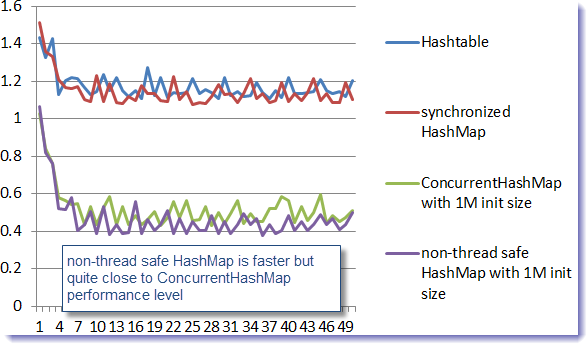
Finally, it is interesting to note that we were able to successfully run the test case with the non-thread safe HashMap by assigning an initial size setting at 1000000, preventing any resize at all. Find below the merged graph results:


The HashMap was our top performer but only when preventing an internal resize. Again, this is definitely not a solution to the thread safe risk but just a way to demonstrate that the resize operation is the most at risk given the entire manipulation of the HashMap performed at that time.

The ConcurrentHashMap, by far, is our overall winner by providing both fast performance and thread safety against that test case.

JBoss AS7 Map data structures usage

We will now conclude this article by looking at the different Map implementations within a modern Java EE container implementation such as JBoss AS 7.1.2. You can obtain the latest source code from the github master branch.

Find below the report:

  • Total JBoss AS7.1.2 Java files (August 28, 2012 snapshot): 7302
  • Total Java classes using java.util.Hashtable: 72
  • Total Java classes using java.util.HashMap: 512
  • Total Java classes using synchronized HashMap: 18
  • Total Java classes using ConcurrentHashMap: 46
Hashtable references were found mainly within the test suite components and from naming and JNDI related implementations. This low usage is not a surprise here.

References to the java.util.HashMap were found from 512 Java classes. Again not a surprise given how common this implementation is since the last several years. However, it is important to mention that a good ratio was found either from local variables (not shared across threads), synchronized HashMap or manual synchronization safeguard so “technically” thread safe and not exposed to the above infinite looping condition (pending/hidden bugs is still a reality given the complexity with Java concurrency programming…this case study involving Oracle Service Bus 11g is a perfect example).

A low usage of synchronized HashMap was found with only 18 Java classes from packages such as JMS, EJB3, RMI and clustering.

Finally, find below a breakdown of the ConcurrentHashMap usage which was our main interest here. As you will see below, this Map implementation is used by critical JBoss components layers such as the Web container, EJB3 implementation etc.

 ## JBoss Single Sign On
 Used to manage internal SSO ID's involving concurrent Thread access
 Total: 1

 ## JBoss Java EE & Web Container
Not surprising here since lot of internal Map data structures are used to manage the http sessions objects, deployment registry, clustering & replication, statistics etc. with heavy concurrent Thread access.
Total: 11

 ## JBoss JNDI & Security Layer
Used by highly concurrent structures such as internal JNDI security management.
Total: 4

 ## JBoss domain & managed server management, rollout plans...
Total: 7

 ## JBoss EJB3
Used by data structures such as File Timer persistence store, application Exception, Entity Bean cache, serialization, passivation...
Total: 8

 ## JBoss kernel, Thread Pools & protocol management
Used by high concurrent Threads Map data structures involved in handling and dispatching/processing incoming requests such as HTTP.
Total: 3

 ## JBoss connectors such as JDBC/XA DataSources...
 Total: 2

 ## Weld (reference implementation of JSR-299: Contexts and Dependency Injection for the JavaTM EE platform)
Used in the context of ClassLoader and concurrent static Map data structures involving concurrent Threads access.
Total: 3

 ## JBoss Test Suite
Used in some integration testing test cases such as an internal Data Store, ClassLoader testing etc.
Total: 3

Final words

I hope this article has helped you revisit this classic problem and understand one of the common problems and risks associated with a wrong usage of the non-thread safe HashMap implementation. My main recommendation to you is to be careful when using an HashMap in a concurrent threads context. Unless you are a Java concurrency expert, I recommend that you use ConcurrentHashMap instead which offers a very good balance between performance and thread safety.

As usual, extra due diligence is always recommended such as performing cycles of load and performance testing. This will allow you to detect thread safety and / or performance problems before you promote the solution to your client production environment.

Please provide any comments and share your experience with ConcurrentHashMap or HashMap implementations and troubleshooting.